
Thymeleaf, Spring MVC and htmx are a combination Java developers can put to work quickly: templates for the view, controllers for the request and partial updates where they help. We now support that programming model with a different execution path: statically compiled rendering code inside a native Java backend.
The template compiler processes a supported subset of Thymeleaf syntax and emits Java renderers with direct model access. Spring MVC-style controllers choose the page or fragment. ParparVM compiles the renderers with the rest of the backend into native code. The response is still ordinary HTML that any browser can display.
This is Sunday’s follow-up to Create an Uber Clone in 1 Minute. It also gives you another way to build an admin site: ordinary HTML served by your Java backend, without requiring a Codename One client.
Move template work out of the request path
The performance case is concrete: production doesn’t parse template files, interpret property expressions or discover model accessors through reflection. A model property becomes a Java getter or field access; a loop becomes generated control flow. The native compiler sees that code alongside the controller and service.
With htmx, the server returns only the part of the page that changed. Static rendering and smaller responses address different costs, and work well together. Database work, network latency and the page itself still determine end-to-end response time.
Keep the useful part of JSP
JSP compiled pages into Java servlet code, as Tomcat’s Jasper documentation describes. Native compilation wasn’t the JSP contract. The useful idea was that a template could become code the runtime already knew how to execute.
The old workflow suited a long-running server you could telnet into and edit in place. I want to edit quickly while developing too. In production, I want a built artifact that went through the same checks as the Java beside it.
Thymeleaf supports template caching, so it would be wrong to describe every request as parsing a fresh file. Our choice goes further: the request path has no template interpreter at all. Editing a template means rebuilding the application.
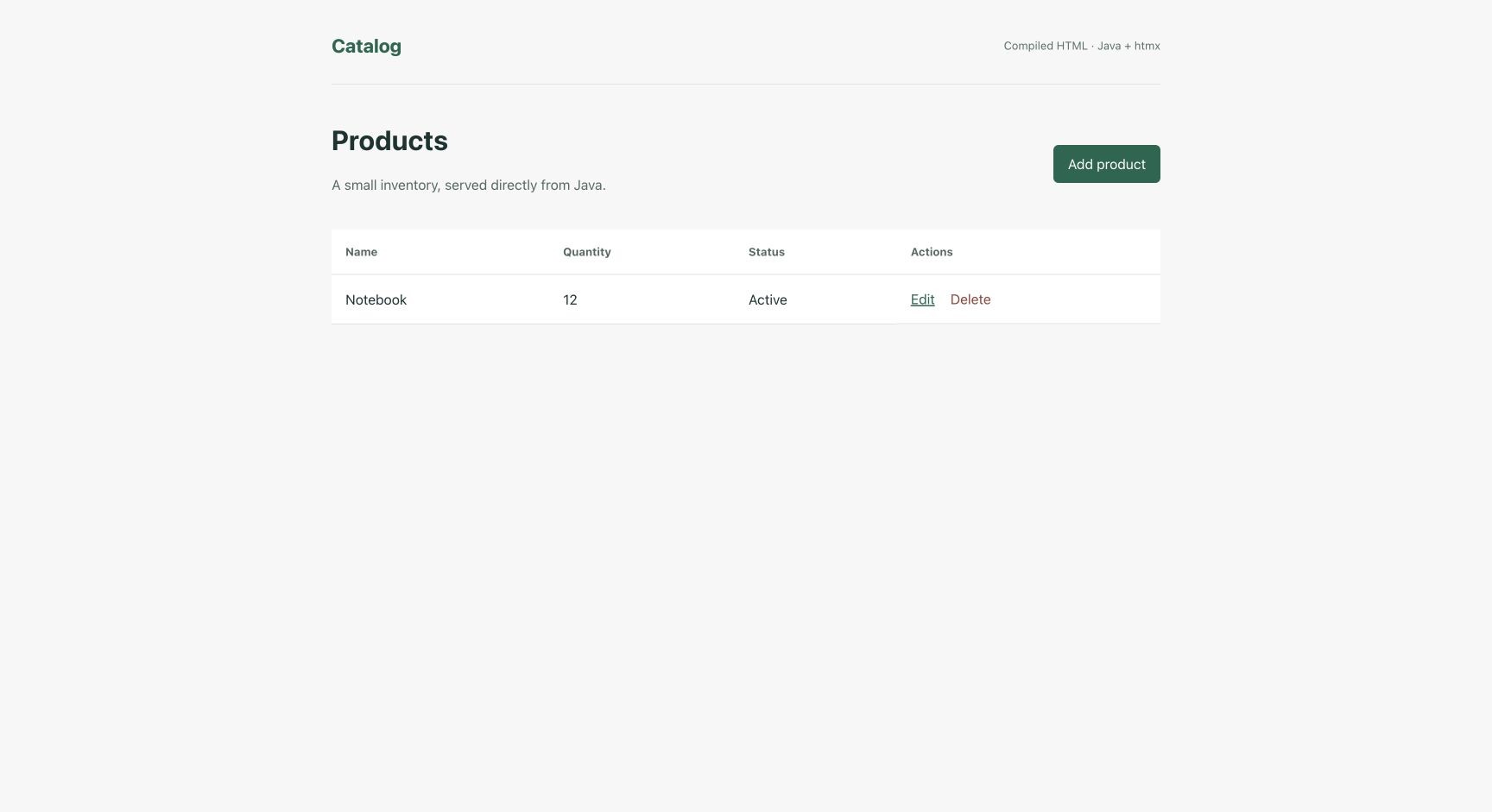
The sample running locally on the JVM with generated view classes. The same renderers enter the native package.
The controller still looks like a controller
The runnable catalog has an in-memory inventory. Its listing method is short:
@GetMapping("/products")
public synchronized String list(Model model, HttpServer.Request request) {
    populate(model);
    return Htmx.isRequest(request) ? "products :: catalog" : "products";
}
This method belongs to a @Controller using com.codename1.backend.annotations and com.codename1.backend.mvc imports. populate copies the catalog into the model. A normal request gets the page; a request from htmx gets its named catalog fragment.
That return value names a compiled view. It doesn’t open a path supplied by the request. The list is synchronized because this small example keeps mutable data in memory; restarting it resets the catalog. A persistent application would delegate to a service and database.
Tell the compiler what your model contains
The template declares the Java type of products. A shortened version of the catalog view looks like this:
<!-- cn1:model products java.util.List<example.Product> -->
<main id="workspace" th:fragment="catalog">
  <table>
    <tbody>
      <tr th:each="product : ${products}">
        <td th:text="${product.name}">Notebook</td>
        <td th:text="${product.quantity}">12</td>
        <td th:text="${product.active ? 'Active' : 'Inactive'}">Active</td>
      </tr>
    </tbody>
  </table>
</main>
The compiler resolves the Java getters or public fields and emits direct access. Rename a property without updating the template and the build fails with a file and source position. That is a useful failure to get before deployment.
Dynamic text is escaped. URL expressions encode their arguments before HTML attribute escaping. Raw HTML insertion and arbitrary method calls are outside this first version’s expression language.
Update a section without building a second frontend
The Add product link in the catalog works as ordinary navigation and carries the htmx enhancement:
<a href="/products/new"
   hx-get="/products/new"
   hx-target="#workspace"
   hx-swap="outerHTML">Add product</a>
The server can return the editor fragment and replace the workspace. The sample includes a pinned local htmx script, shared layout fragments and forms that also work with JavaScript disabled.
Form binding uses a dedicated DTO. Keep BindingResult immediately after that parameter, then return the editor when validation fails:
@PostMapping("/products")
public synchronized String add(
        @ModelAttribute("form") ProductForm form,
        BindingResult errors,
        Model model,
        HttpServer.Request request) {
    validate(form, errors);
    if (errors.hasErrors()) return invalid(model, request, "/products", "Add product");
    int id = nextId++;
    products.put(id, new Product(id, form.name.trim(), form.quantity, form.active));
    return saved(model, request);
}
This is an excerpt from Catalog, including its storage and validation helpers by reference. saved chooses the full-navigation redirect or the updated fragment. Returning form errors with status 200 lets htmx display them normally.
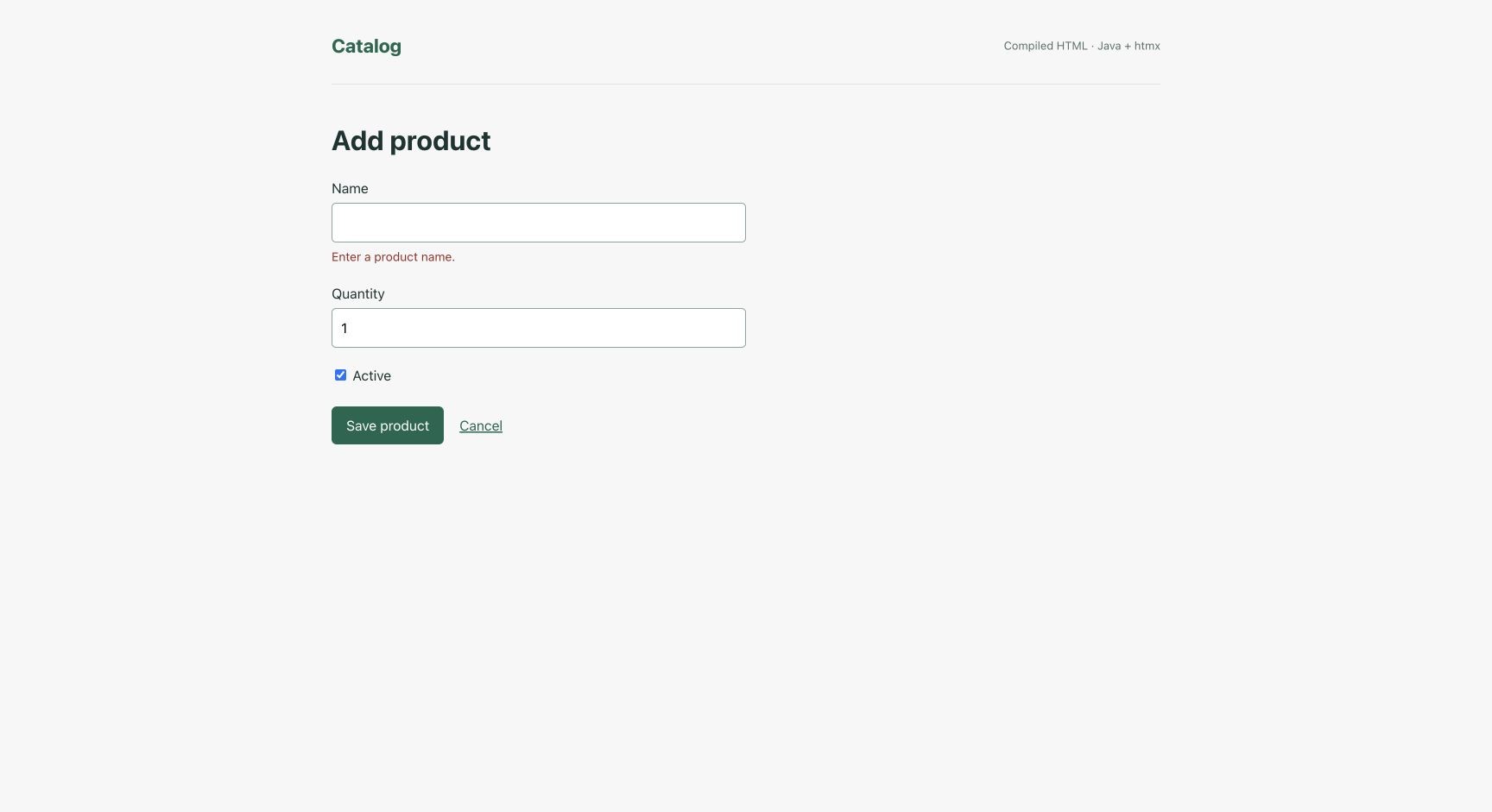
Submitting the form without a name returns the editor fragment with the error beside the field.
The existing security chain handles cross-site request forgery (CSRF) protection. Generated forms and mutating htmx controls carry the available token. Declaring an HTML controller doesn’t create that security configuration for you; the sample’s WebSecurity shows it.
A smaller language is a trade
This is a Thymeleaf-style subset, not the Thymeleaf library. There is no Spring Expression Language, custom dialect support, arbitrary method invocation or runtime template editing. Form DTOs support scalar values; they don’t bind whole ORM entity graphs. The views chapter lists supported attributes and migration boundaries.
Those restrictions buy typed property access and a renderer that ships as ordinary compiled application code. They also mean porting an existing template can take work. I would start with a small admin page and its form errors before attempting a large site.
From scripts/backend-mvc, with this checkout’s backend and plugins installed, run:
mvn package
mvn com.codenameone:codenameone-maven-plugin:8.0-SNAPSHOT:backend
Open http://localhost:8080/products. The sample’s README has the native packaging command and a smoke test covering normal forms, htmx, escaping and CSRF rejection. PR #5974 introduced the implementation.
I want the development loop to stay short. I also want the production binary to know how to render every page before the first user arrives.
Discussion
Which template error would you most like your build to catch?