If you’re used to opening a page and immediately changing an app, installing a Java development environment is a substantial detour. I want your first encounter with Codename One to be the app running.
Our new browser IDE is a highly experimental, very early preview. Open it, press Run and start changing the Java. It has a project tree, multiple files and an application preview. Think of the Playground growing into a proper IDE workspace.
I’m calling it Not a Cloud IDE because the editing, compilation for preview and application execution happen in your browser. Your project files stay in that browser’s storage. The ordinary build server enters the workflow when you request a cloud build.
Start with an app on the screen
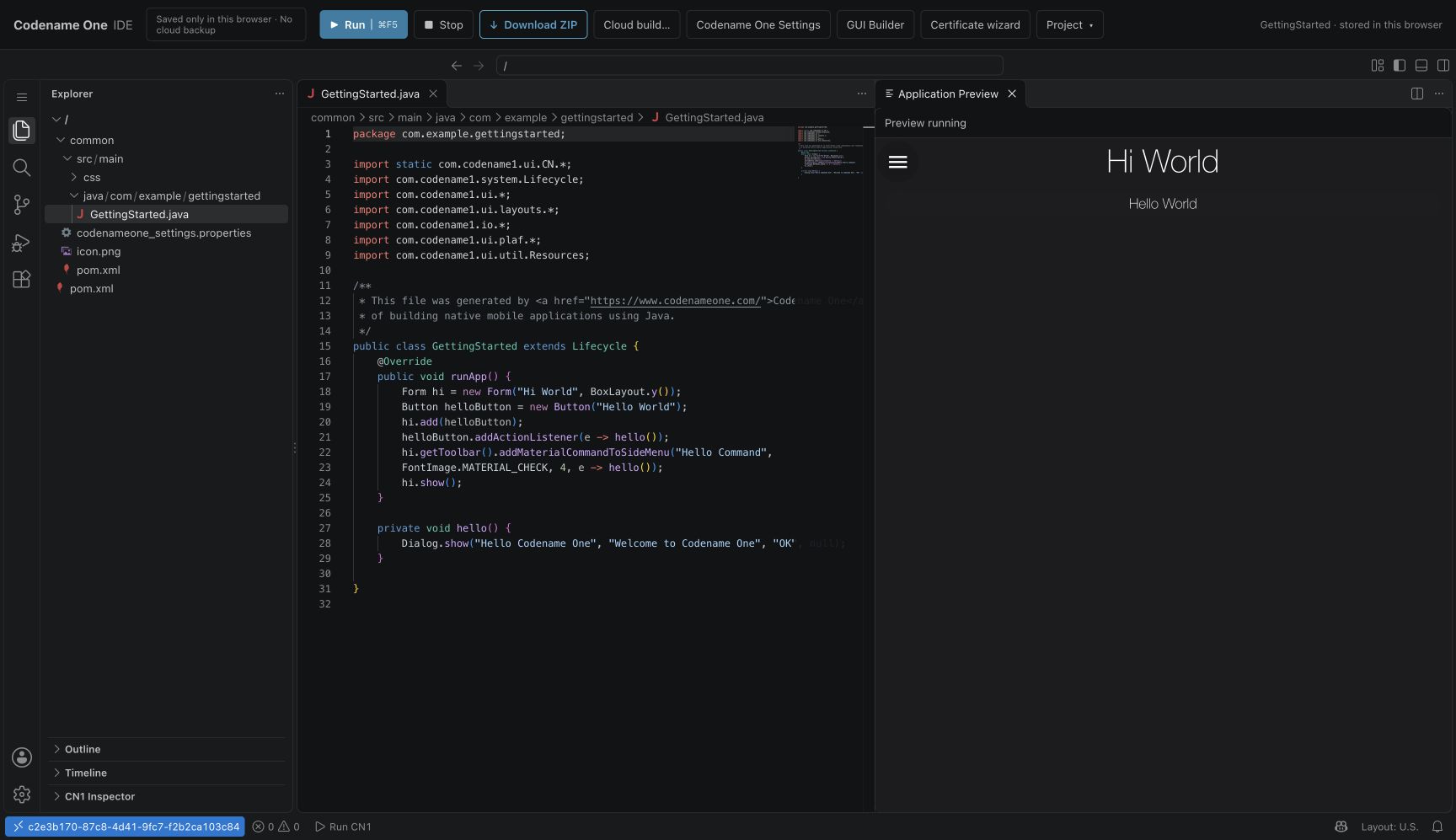
The first visit opens a GettingStarted project. Press Run in the top toolbar. The editor compiles Java and shows the application beside its source. This screenshot shows that starter running in the public preview:
You can start with a small edit. Inside the starter’s runApp() method, this replaces its initial screen with a counter:
Form hi = new Form("First app", BoxLayout.y());
Label count = new Label("Trips: 0");
Button add = new Button("Add a trip");
int[] trips = {0};
add.addActionListener(event -> count.setText("Trips: " + (++trips[0])));
hi.addAll(count, add);
hi.show();
The starter already imports the UI and layout classes. Run it, click the button and change the label. The point of this first exercise is to shorten the distance between an idea and a visible result.
Compiler errors appear against the source. Completion, hover information and source navigation help you explore the API. They don’t amount to a full Java language server or IntelliJ’s refactoring model, and I don’t want to present them that way.
What runs where
The site delivers the editor and toolchain. Dependencies may need downloading too. That doesn’t make the editing session a remote machine: there is no server-side workspace running your development loop.
A cloud build is an explicit handoff of build inputs to the existing Codename One service. It is separate from local preview and doesn’t back up your editable workspace. Opening the IDE also doesn’t make the whole workflow available offline.
Browser storage is local storage
The toolbar says Saved only in this browser · No cloud backup. Take that literally. Signing in on a second computer or switching browser profiles won’t bring your project along.
Use Download ZIP to keep a backup and take the project to your desktop. Clearing the site’s browser data or using private browsing can erase your local work. The export gives you a project you can continue building with the usual Maven or Gradle tools.
This is also why I like the approach for getting started. You can try the framework in a page, then keep the code when you’re ready to set up a local environment.
Where the experiment ends today
This will not replace IntelliJ. We can’t reproduce the full Java ecosystem, every desktop tool and every build plugin inside JavaScript. Browser preview supports a defined subset of dependency and build behavior; projects outside that subset need a local build.
Backend projects can be created, edited and exported, but there is no backend runtime in the browser. Full stack preview currently runs the client only. Don’t expect Wayline’s backend to start inside the editor tab.
The IDE exposes settings, GUI Builder and cloud-build actions, but this is early software. A successful browser preview is also not proof that every device API will behave identically on a phone. Check your real targets as the project grows.
Make the first experiment small
Last week’s Playground compiler showed real Java compilation in a page. The IDE gives that loop a workspace you can grow beyond one snippet.
Try the counter, change its layout and download the project. That is the experience I want to make ordinary: a person curious about Java can see their own change running before spending the afternoon configuring tools.
This closes our weekly release series. Between a full-stack ride-hailing application and a browser workspace, we’re working on both ends of the same problem: getting you to the part of an application that is yours.
Discussion
What is the first small app you would try if opening a page were all the setup it needed?